Flam Tool
A Studio Pro script for creating flam effect on MIDI notes.
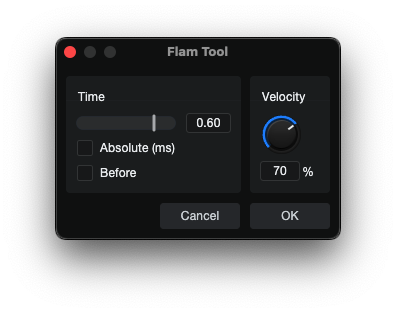
Click for details
The Flam Tool script in this repository is a working example demonstrating:
classfactory.xmlwithEditTaskregistrationmetainfo.xmlwithPackage:SkinFiledeclarationskin.xmlwithDialogGroup,Slider,EditBox,CheckBox,Knob, andLabelelementsmain.jswithprepareEdit(),performEdit(),IParamObserver, and note manipulation
Source Code Files:
Overview
The Flam Tool duplicates selected MIDI notes and offsets them in time to create flam articulations. It provides control over timing, direction, and velocity of the primary or secondary note.
User Interface Controls
Time Slider
- Range: -1.0 to 1.0
- Description: Controls the magnitude and direction of the flam timing offset.
- Negative values (-1.0 to 0): The original note shifts back (later in time), the new note stays at the original position.
- Positive values (0 to 1.0): The new note shifts back (later in time), the original stays at the original position.
Absolute (Checkbox)
- Checked: Timing is measured in absolute milliseconds (ms).
- Unchecked: Timing is relative to the musical tempo (beats).
Before (Checkbox)
- Checked: Notes shift before their original position (earlier in time, toward the left in the editor).
- Unchecked: Notes shift after their original position (later in time, toward the right in the editor).
Velocity Knob
- Range: 1% to 100%
- Description: Sets the velocity of the secondary note as a percentage of the original note's velocity.
Value Calculations
Musical Mode (Absolute Unchecked)
The Time Slider value is mapped to a musical offset in beats:
Max shift = 0.25 beats (quarter note)
shift = timeSlider * 0.25
| Time Slider | Shift (beats) | Note Value |
|---|---|---|
| ±1.0 | ±0.25 | Quarter note |
| ±0.5 | ±0.125 | Eighth note |
| ±0.25 | ±0.0625 | Sixteenth note |
| ±0.125 | ±0.03125 | Thirty-second note |
Absolute Mode (Absolute Checked)
The Time Slider value is mapped to an offset in milliseconds, which is then converted to beats using the current tempo:
Max shift = 100ms
shiftMs = timeSlider * 100
shift = shiftMs * (tempo / 60000)
| Time Slider | Shift (ms) | At 60 BPM (beats) | At 120 BPM (beats) |
|---|---|---|---|
| ±1.0 | ±100 ms | ±0.100 | ±0.200 |
| ±0.5 | ±50 ms | ±0.050 | ±0.100 |
| ±0.25 | ±25 ms | ±0.025 | ±0.050 |
| ±0.125 | ±12.5 ms | ±0.0125 | ±0.025 |
Velocity Calculation
The secondary note's velocity is calculated as a percentage of the original note's original velocity:
newVelocity = originalVelocity * (velocityPercent / 100.0)
Example:
- Original note velocity: 100
- Velocity setting: 75%
- New note velocity: 100 * (75/100) = 75
Position Logic
The final start position for both notes is determined by combining the Time, Absolute, Before, and Before settings.
| Before | Direction | Shift < 0 (slider left) | Shift > 0 (slider right) |
|---|---|---|---|
| Unchecked | Right | Original moves right, new note stays | New note moves right, original stays |
| Checked | Left | New note moves left, original stays | Original moves left, new note stays |
Practical Examples:
-
Time = -0.25, Absolute = OFF, Before = OFF
- Direction: Right (later)
- Since shift < 0: Original note shifts right by 0.25 beats, new note stays at original position.
-
Time = -0.25, Absolute = OFF, Before = ON
- Direction: Left (earlier)
- Since shift < 0
- New note moves left by 0.25 beats, original stays.
-
Time = 0.5, Absolute = ON, Tempo = 120 BPM, Before = ON
- Shift = 0.5 * 100ms
- Shift in beats = 50 * (120 / 60000)
Usage
- Select notes in the Piano Editor, or ensure you have an Instrument Part open with notes (the script will process all notes if none are selected).
- Run the Flam Tool script from the Action menu.
- Configure the timing, direction, and velocity settings as desired.
- Click OK to apply.
- Use Undo (Cmd+Z) to revert if needed.
Tips
- Negative Time values keep the original note in place and move the duplicate, which is often the more natural-sounding flam.
- Use "Before" with positive Time to create "dragged" flams that precede the main note.
- Lower Velocity percentages (50-75%) create more realistic secondary flams that blend naturally.
- Absolute Mode is useful for consistent timing regardless of tempo changes.
Development Note: This script and its documentation were developed with the assistance of agentic coding tools.